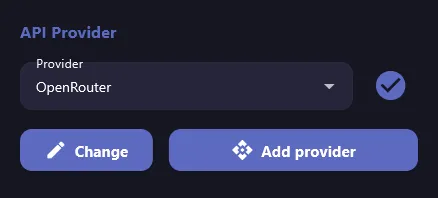
AI Provider
Select a previously configured API service or a local engine hosting your models from the dropdown list.
To the right of the list, a connection status indicator is displayed:
- Blue checkbox: The connection is successfully established.
- Blue question mark — the connection was successful, but the provider returned a 404
error in response to a request for available models. This could mean that the API address is
specified incorrectly, or simply that the provider does not have a models endpoint, in which case
the model name must be entered manually.
- Red exclamation mark: Connection error.
Clicking the indicator retriggers the connection test for the selected provider.
The "Edit" and "Add Provider" buttons open a configuration window where you can input the API URL and
access key, which are provided by your LLM backend.
An "Advanced Parameters" field is available for experienced users. Custom configurations entered here in
JSON format are automatically injected into the API request body.
For example, if you provide the following JSON:
{
  "provider": {
    "ignore": ["lepton", "together"],
    "data_collection": "deny"
  }
}
The application will include these parameters in every request sent to the model:
{
  "model": "vendor/model-name",
  "messages": [{"role": "user", "content": "Hello!"}],
  "provider": {
    "ignore": ["lepton", "together"],
    "data_collection": "deny"
  }
}
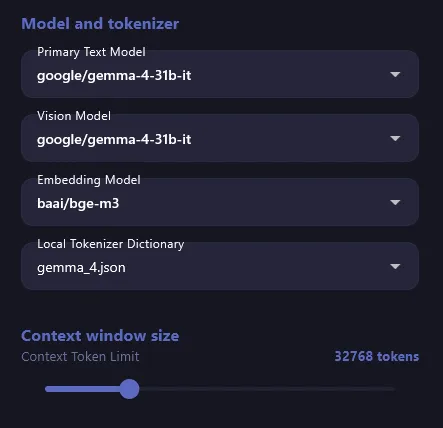
Model, Tokenizer & Context Size Selection
- Main Text Model: The core AI responsible for generating text responses and handling
the roleplay. All other text generation parameters (context window size, temperature, Min P, etc.)
are applied directly to this model.
- Vision Model: The model responsible for image recognition. If your main text model
is multimodal, you can select it here as well. Alternatively, you can choose a different vision
model to save resources. This setting does not directly affect the chat history, as the main text
model receives a text description of the image in the prompt context.
- Embedding Model: The model used for text vectorization, which is required for
accurate searching within Lorebooks. Choose carefully, as many embedding models do not support the
Russian language well. Furthermore, changing this model while you have active Lorebooks will trigger
a complete re-vectorization of your data, consuming extra time and resources.
Local Tokenizer Dictionary is required for calculating token usage in the chat. If the
exact tokenizer of your model is unknown, it is recommended to select the safe Llama 3 profile. While it
might slightly overestimate the token count, it prevents unexpected API costs or out-of-memory errors
when pushing the limits of the LLM or your VRAM. For exact calculations, you can manually download the
required dictionary and copy it into the user tokenizers directory
(My Documents/DenAI/tokenizers).
Context Token Limit (slider) defines the total memory allocation (in tokens) for the
current chat session. Higher values allow the model to retain a longer chat history before automatic
context summarization is triggered. Keep the following in mind:
- Every model has its own strict limitations. When using a smaller or older generation model, make
sure to check its maximum context window size.
- Although modern LLMs support context windows of hundreds of thousands or millions of tokens,
expanding it significantly leads to high commercial API costs or VRAM exhaustion during local
hosting. Users with no prior LLM experience are advised to research this topic further.
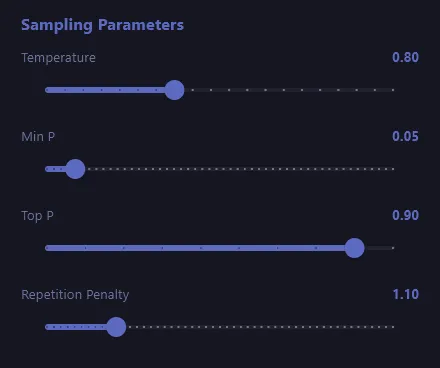
Sampling Parameters
These settings directly control the style, logic, and unpredictability of the AI's responses. Tuning
these sliders helps achieve natural and coherent text flow during roleplay.
- Temperature: Controls the randomness and "creativity" of the model's responses.
- Typical range: 0.5 to 1.5 (default is usually 1.0).
- Usage: Low values (0.5–0.7) make responses strict, logical, and predictable. High
values (1.1–1.5) add emotional depth, unexpected plot twists, and stylistic variety, but
setting it too high causes the AI to lose coherence or generate nonsense.
- Min P (Minimum Probability): A modern and highly effective filter that strips away
low-probability tokens based on their relative confidence. Unlike the older Top P method, it scales
dynamically according to how confident the model is.
- Typical range: 0.02 to 0.10.
- Usage: Allows you to use high temperature settings without breaking the AI's logic. A
value of 0.05 removes any words whose probability is less than 5% of the top choice,
cleaning up unwanted text noise.
- Top P (Nucleus Sampling): Restricts the model's choices to a pool of words that
make up a specified cumulative probability percentage.
- Typical range: 0.85 to 1.0.
- Usage: Usually left at 1.0 (disabled) if Min P is active. If you prefer classic
sampling, reducing Top P to 0.9–0.95 cuts off highly obscure words, keeping the output
stable.
- Repetition Penalty: Controls how heavily the model is penalized for reusing the
same words and phrases within the context window.
- Typical range: 1.0 (no penalty) to 1.2.
- Usage: If the AI starts looping, echoing your inputs, or repeating fallback phrases
across messages, gently increase the slider to 1.05–1.15. Avoid values above 1.2, as this
forces the model to break grammar rules just to find synonyms for banned words.
Global System Prompt
A text field on the right side of the screen that establishes core rules applied silently across all chat
sessions. This functions as the behavioral foundation that the AI must follow regardless of the active
character card.
Purpose: Used to host global technical rules so you do not have to copy-paste them into
every single character card.
Example of a solid global RP prompt:
Write in a narrative, literary style. Avoid clichés, poetic metaphors, and purple prose.
Focus on action, dialogue, and sensory details. Never speak, act, or think for the User.
Stay in character at all times.